
Inventory · ordering · invoices · 86 board

The back of house, handled.

Count the walk-in, send vendor orders built from your pars, check deliveries in from the invoice, and find any bill in seconds. One phone app the whole kitchen uses - from the owner to the dish crew.

  • iPhone & Android
  • Works with no signal
  • English & Español
  • Nothing to install from a store
Why

Retire the clipboard, the spreadsheet and the group text.

Today

  • Counts on a clipboard, typed into a spreadsheet later - if someone remembers.
  • Orders texted, called in, or emailed from someone's personal phone.
  • Two people order the same thing. Nobody orders the other thing.
  • Invoices in a shoebox. "What did we pay for cups last month?" - no idea.
  • "We're out of ketchup" lives in one person's head until service.

With BackOfThe.House

  • Count in walking order on a phone; the order builds itself from your pars.
  • Orders go to the vendor from your restaurant's own email address.
  • One order per vendor. Everyone works on the same one.
  • Every bill scanned into one searchable ledger, checked against the order.
  • The 86 board pings the right people, and shows who's getting it.
How it fits

A week in the app

  1. CountWalk the shelves once. Items come up in the order they're stored. No signal in the basement? It saves on the phone.
  2. OrderPick weekday or weekend pars. Proposed amounts are filled in; nudge with + / −, send. Staff orders can wait for a manager's OK.
  3. Check inSnap the invoice at the back door. If it matches the order, it checks itself in. If not, you see what's short or priced differently.
  4. KnowEvery bill in one ledger. Usage and par suggestions from real counts. A count log that shows who did what.
Inventory control

Count, order, receive - and know what you really used.

When counting, ordering and receiving all happen in one app, nothing falls between the cracks. The app knows what came in and what's still on the shelf - so it knows what you actually used, item by item.

1 · What came in

Every delivery checked in against its invoice, plus anything bought at the store - entered on the item you always count.

2 · What's left

The shelf count, done in walking order on a phone. The count log shows who counted and when.

3 · What you used

Last count + what came in − this count. Real usage, not a guess - week after week.

  • Stop over-ordering. Pars set from what you really go through, weekday and weekend.
  • Spot the leaks. When an item's usage jumps for no reason, you see it - waste, portioning or product walking out the back door.
  • Catch vendor drift. Shorts, substitutions and price changes are flagged at the back door, not at month-end.
Inventory

Counting that takes one walk.

Your count sheets list items in the order you walk the storage - shelf by shelf - so nobody hunts and nothing is skipped.

  • Count in the unit on the shelf. Bags, jugs, cans - the app does the case math.
  • Shelf photos on every item. Tap the photo button: no more guessing which detergent.
  • Works offline. Counts save on the phone and send when there's signal.
  • Bought it at the store? A run to the restaurant supply house goes on the item you always count, so usage stays right.
  • Count log. See every count, who did it, and whether an order followed.
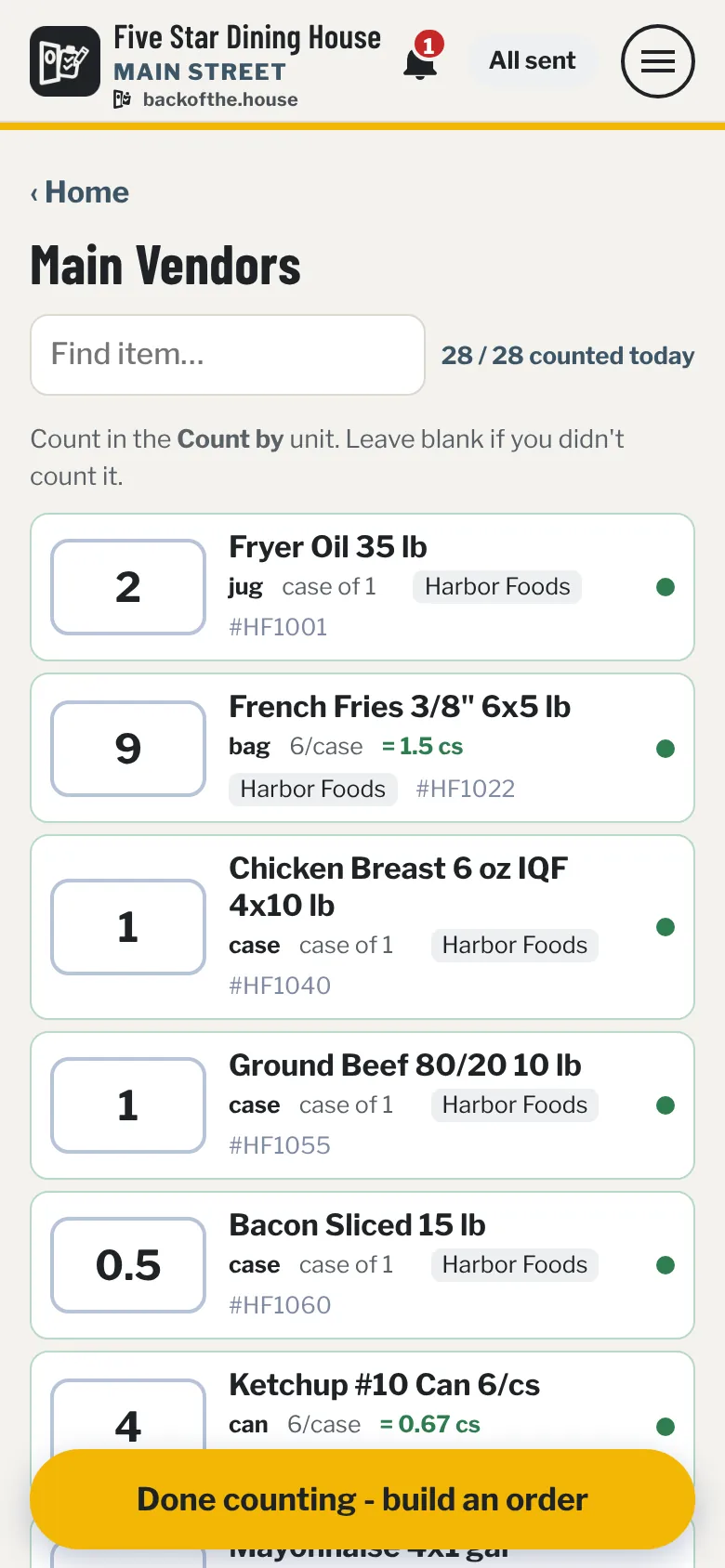
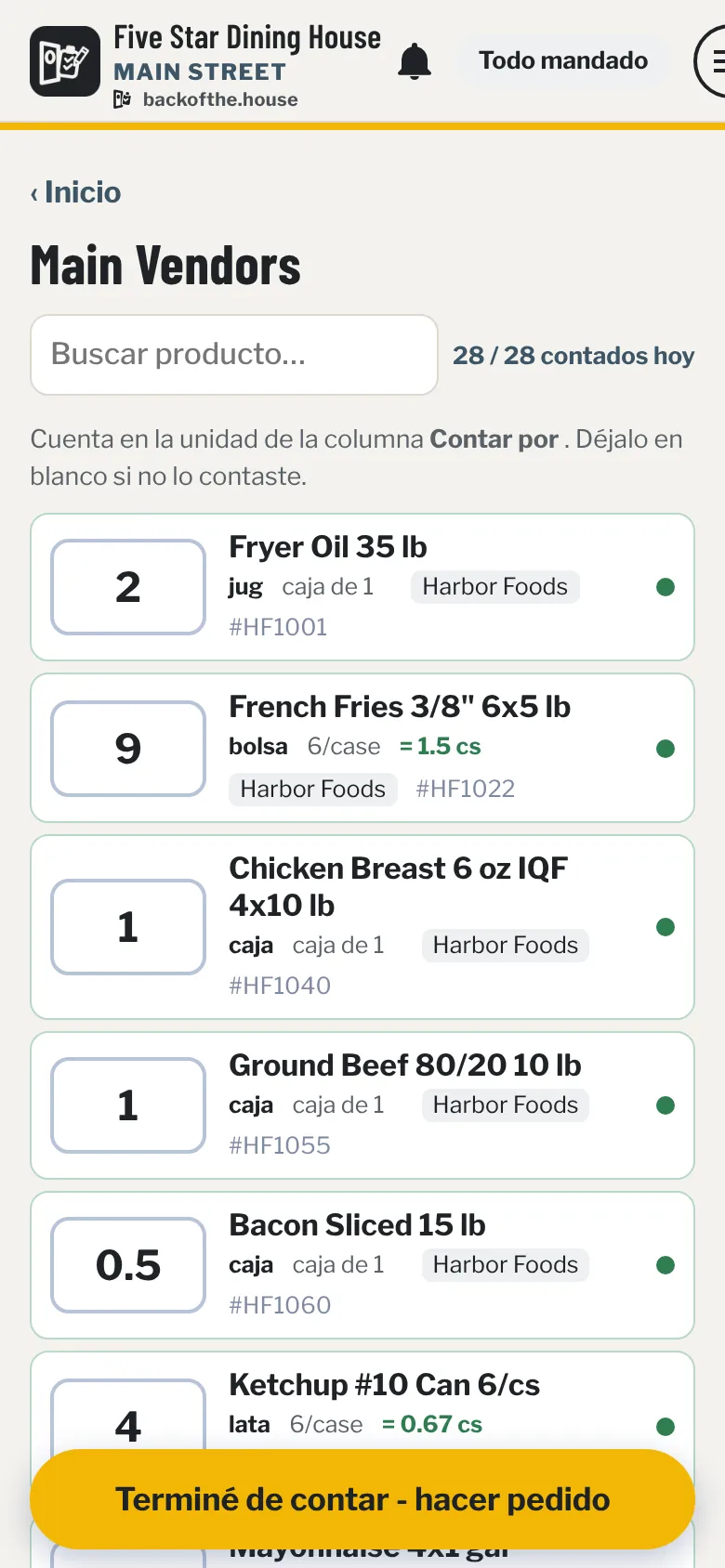
Count sheet: a big box for each item in walking order, the unit to count in, the case size and vendor, and 28 of 28 counted today.
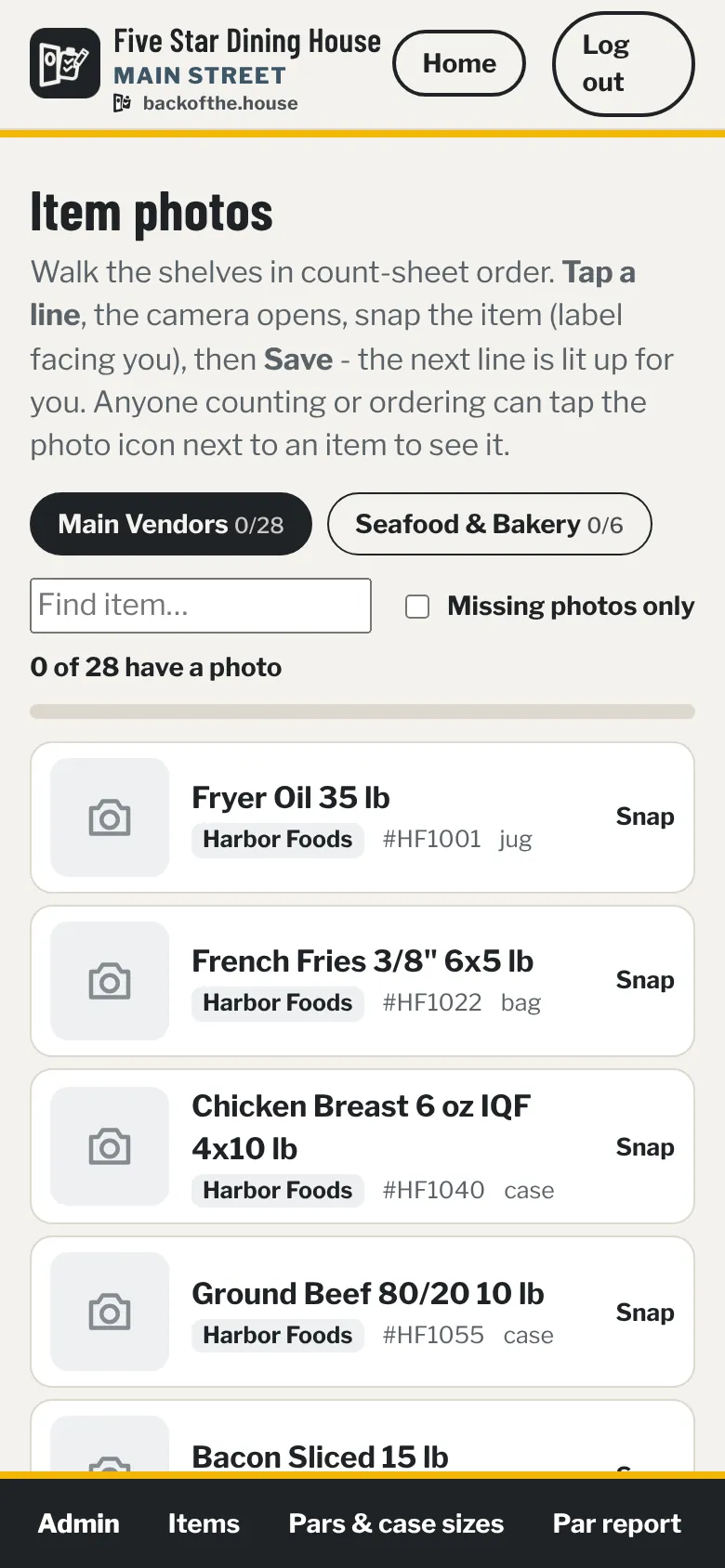
Item photos page: the count sheet in walk order with a Snap button on each line and a counter of how many items have a photo.
Ordering

Orders built from your pars.

Proposed = par minus what's on hand, rounded up. Weekday or weekend pars - the app asks before you start and again before you send.

  • One order per vendor. Whoever starts it, that's the order everyone else opens and adds to.
  • Manager review. Kitchen staff send for an OK; you trust people vendor by vendor when you're ready.
  • Sent from your address. Vendors get a clean email from your restaurant, with split cases marked.
  • Add-ons, Saturday splits, website vendors. Forgot something? Add to the order that already went.
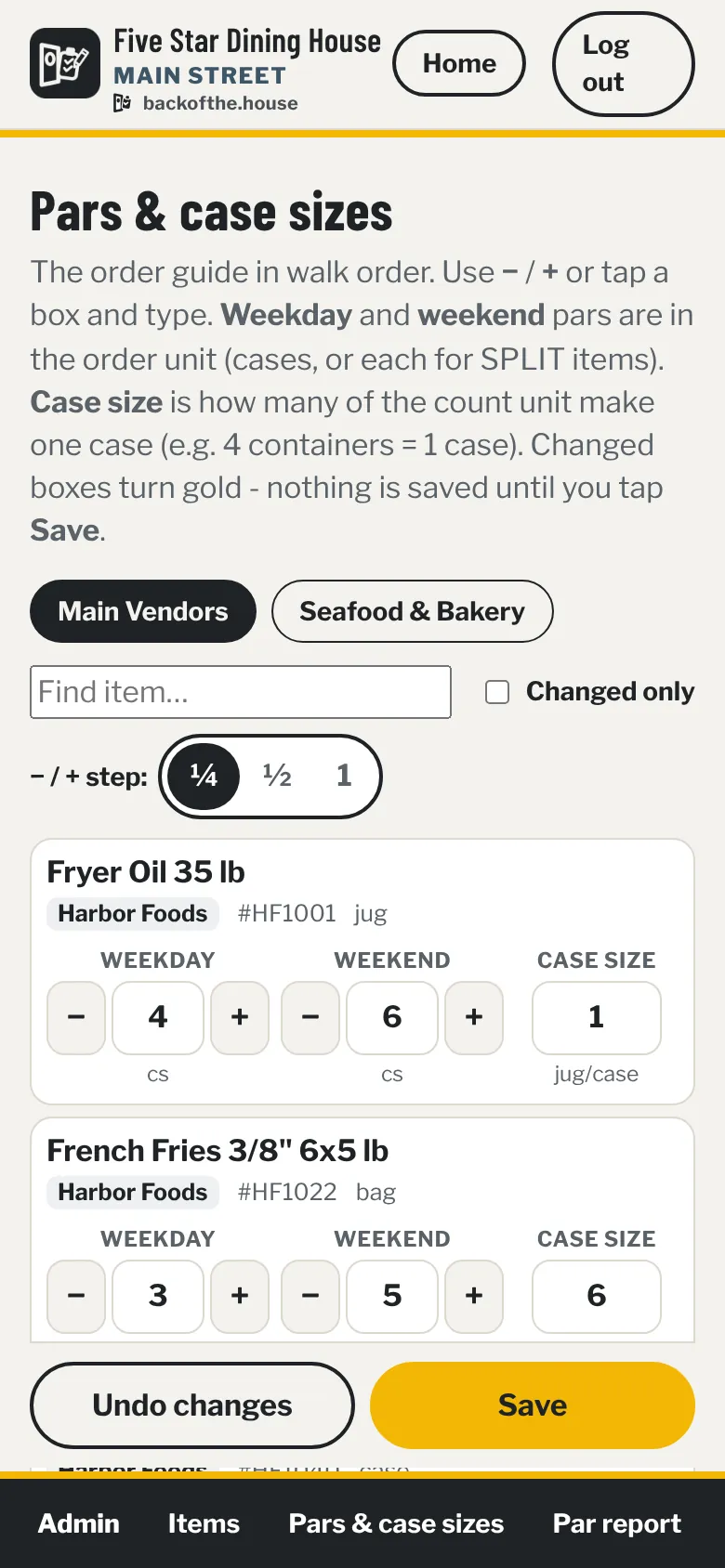
  • Pars on one page. Weekday par, weekend par and case size for the whole guide, with − / + in quarters.
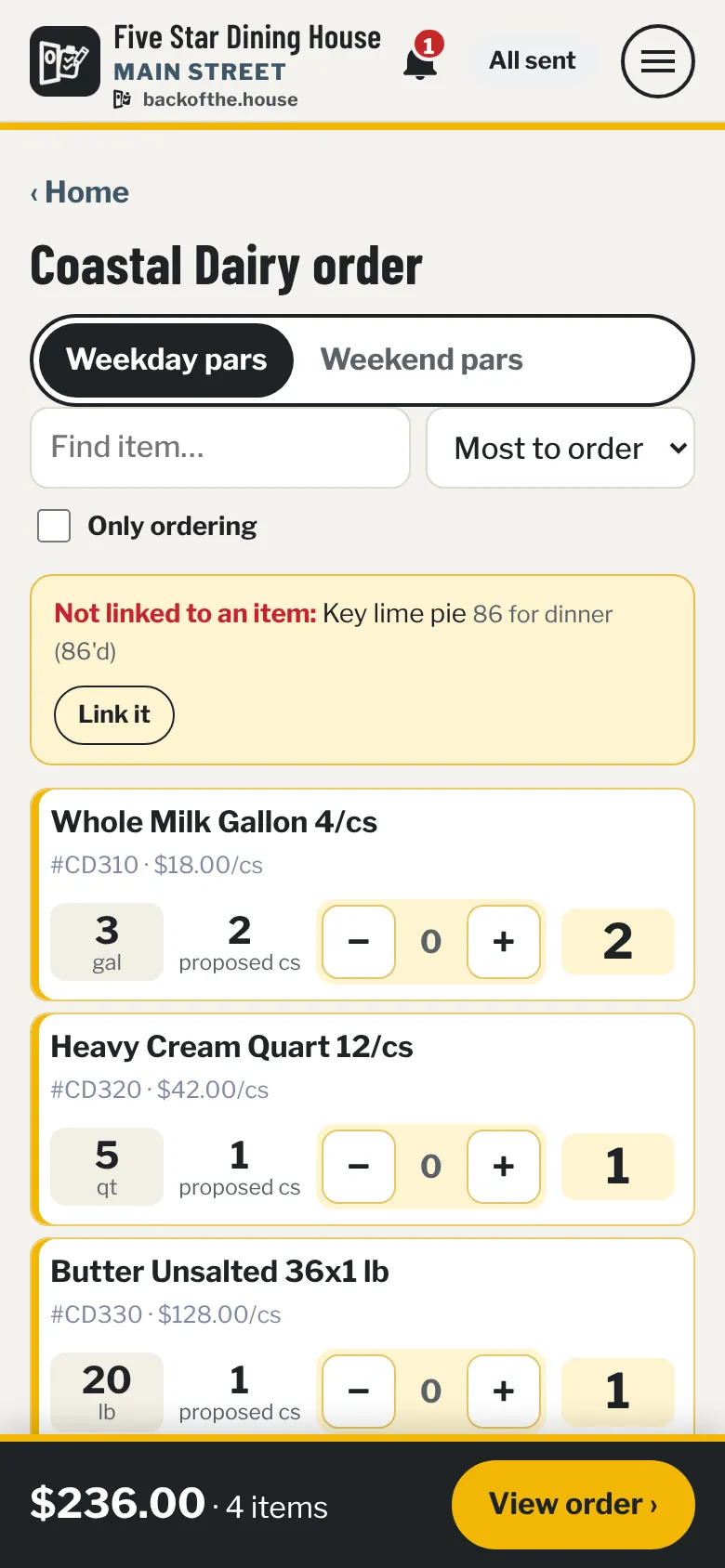
Order screen for a dairy vendor on weekday pars: each line shows on hand, proposed cases, minus and plus buttons and the amount to order, with a flagged item at the top.
Pars and case sizes page: every item with weekday par, weekend par and case size boxes and minus and plus buttons, stepping by a quarter.
Deliveries

The invoice does the checking.

At the back door, snap the invoice. If it matches the order, the delivery checks itself in. If it doesn't, you see exactly what's off.

  • Short, extra, not ordered, price changed, total off - flagged line by line.
  • Short? Tell a manager in one tap. They get a ready-to-send email to the vendor and a no-login link to text the driver.
  • Subs aren't shorts. Mark what came instead; managers hear about it.
  • No invoice? Count it in by hand - with a reason the office can see.
  • Crew Leads can check in without seeing prices or ordering.
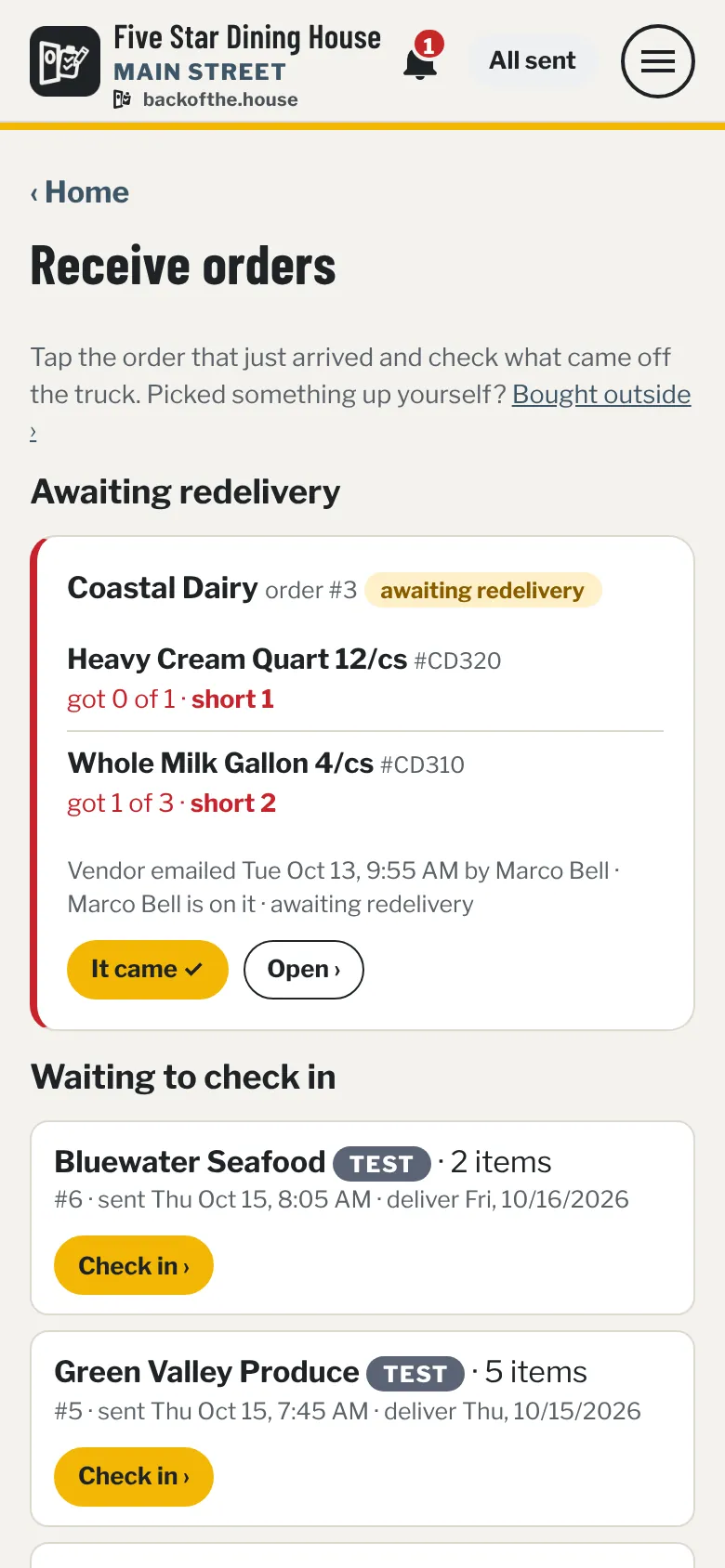
Receive orders: a dairy delivery awaiting redelivery with two short items, and today's deliveries waiting to check in.
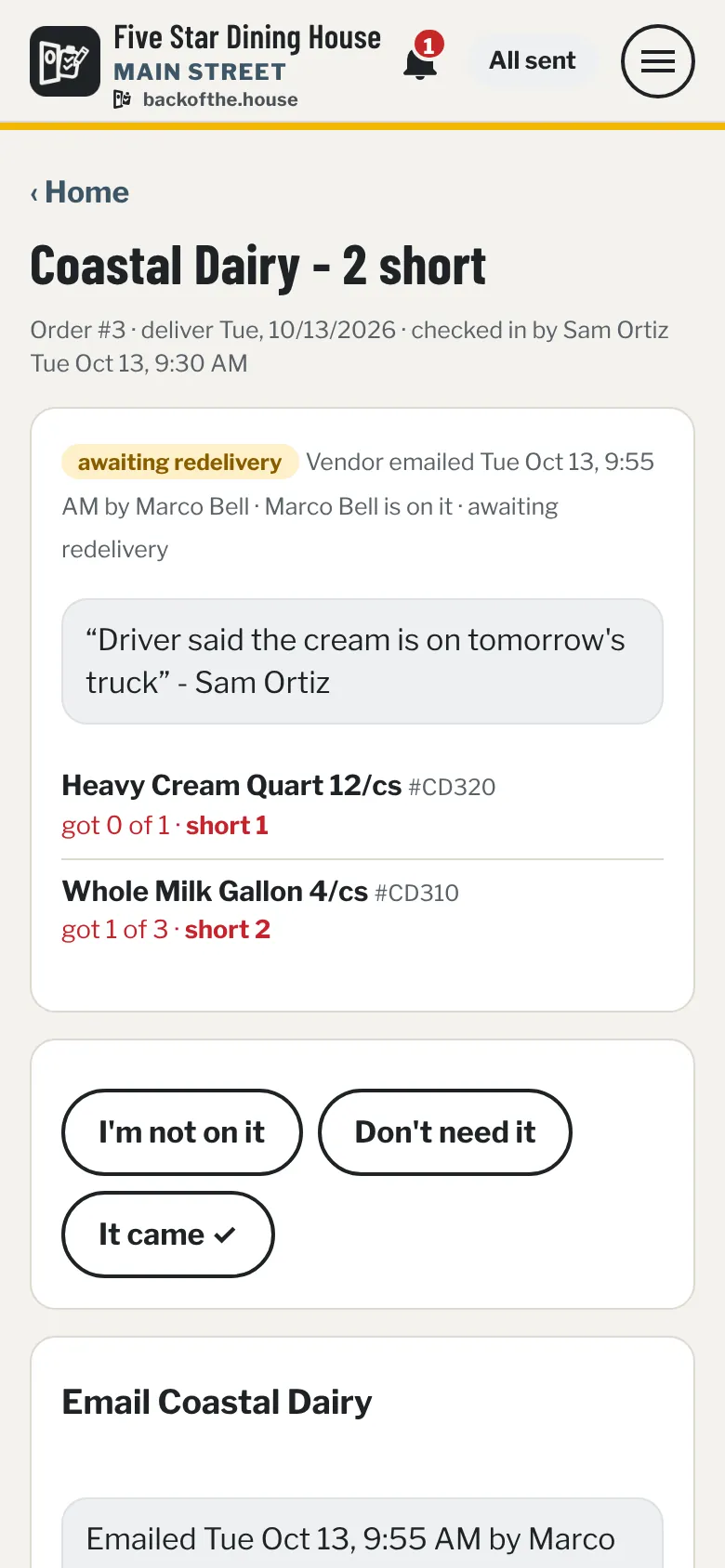
Short on delivery card: the items that came short, the driver's note, and buttons for I'm on it, Don't need it and It came.
Invoices

Every bill, one ledger, found in seconds.

Photos or PDFs - vendor invoices, store receipts, the utility bill. The reader fills in the vendor, number, date, lines and totals.

  • Find invoice searches number, vendor, date, amount, notes and every line item.
  • "What did we pay for cups?" Each hit shows that line with quantity and price.
  • No duplicates. Scan the same bill twice and the copy stays out.
  • Rent and non-food stay private to owners and managers.
  • Export for your accountant. A CSV of the ledger - no live connection to your books needed.
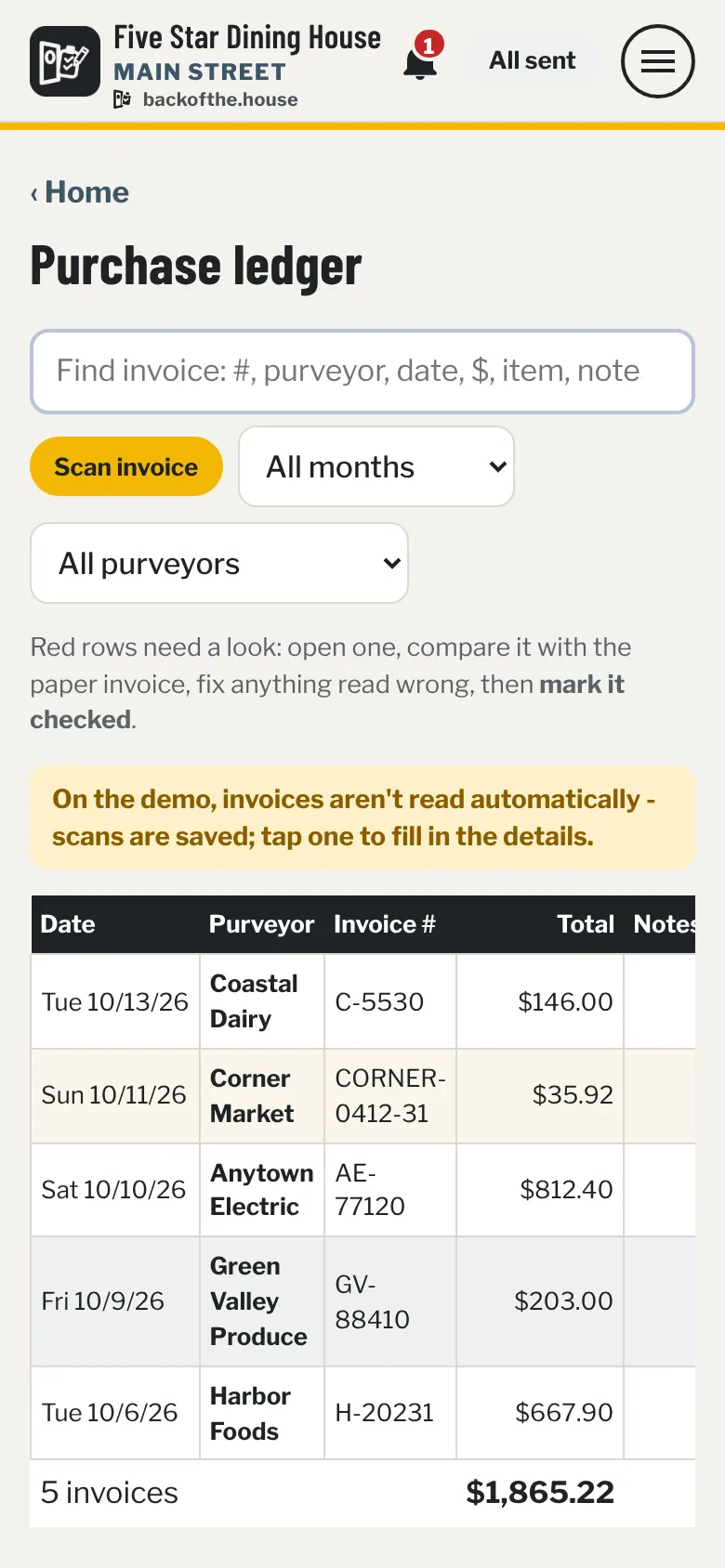
Purchase ledger: a search box, month and vendor filters, and a table of invoices with date, vendor, invoice number and total.
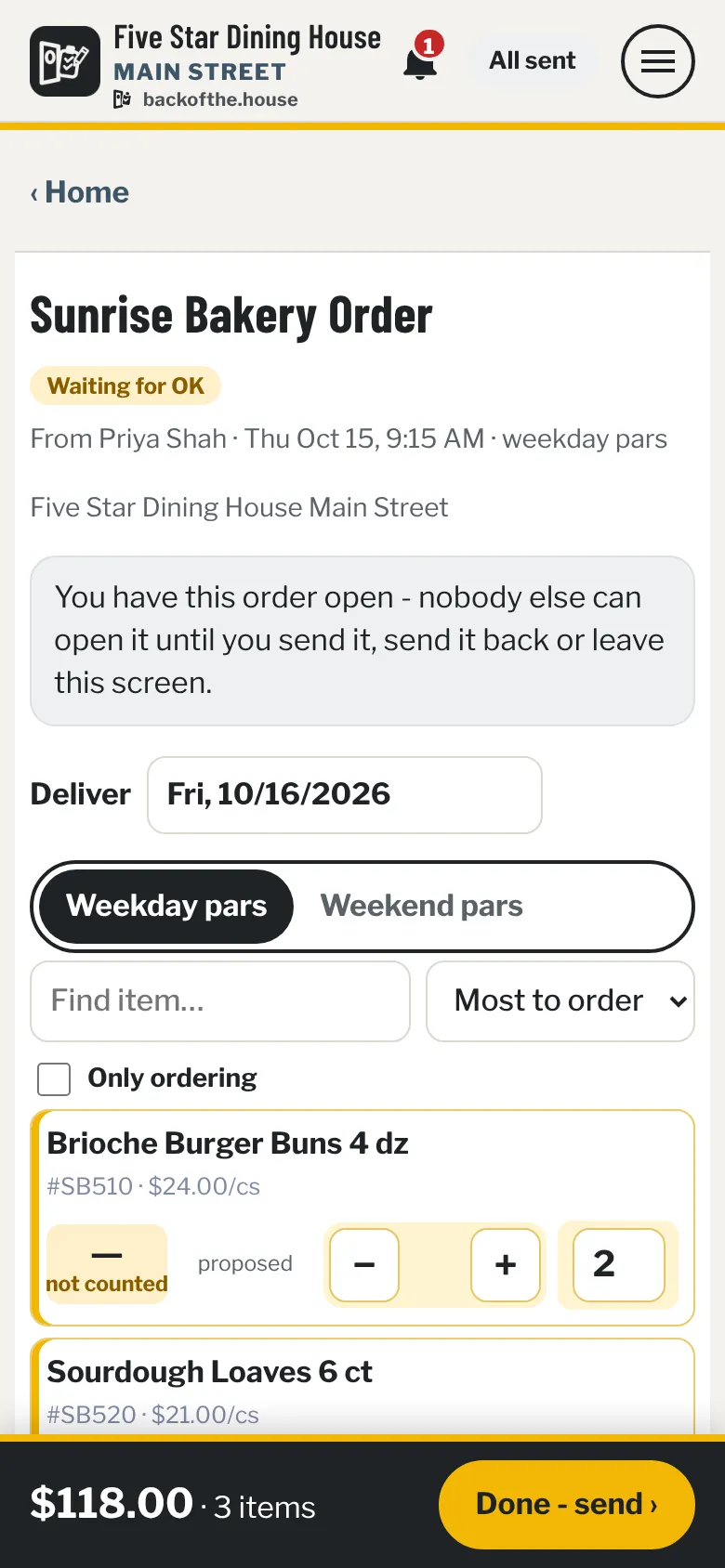
A kitchen staff member's order waiting for a manager's OK, with the delivery date, weekday pars and each line with plus and minus buttons.
The crew

The 86 board, notes, tasks and alerts.

Out of something, or about to be? Two taps. The people who can fix it hear about it - and everyone sees who's on it.

  • 86LOWBACK flagged items show right on the order screen.
  • I'm on it. Tap a name; everyone on alerts hears it's handled.
  • Message the crew with notes. Send a note to one person, a few, or everyone - their phone buzzes with "Note for you" and who it's from. No personal numbers, no group text.
  • Tasks & checklists. Opening list, deep clean, "call the rep" - for one person, a few, or everyone.
  • Nudges. "Order not sent", "delivery not checked in" - only when it really isn't done.
  • English or Español, per person - screens and phone notifications.
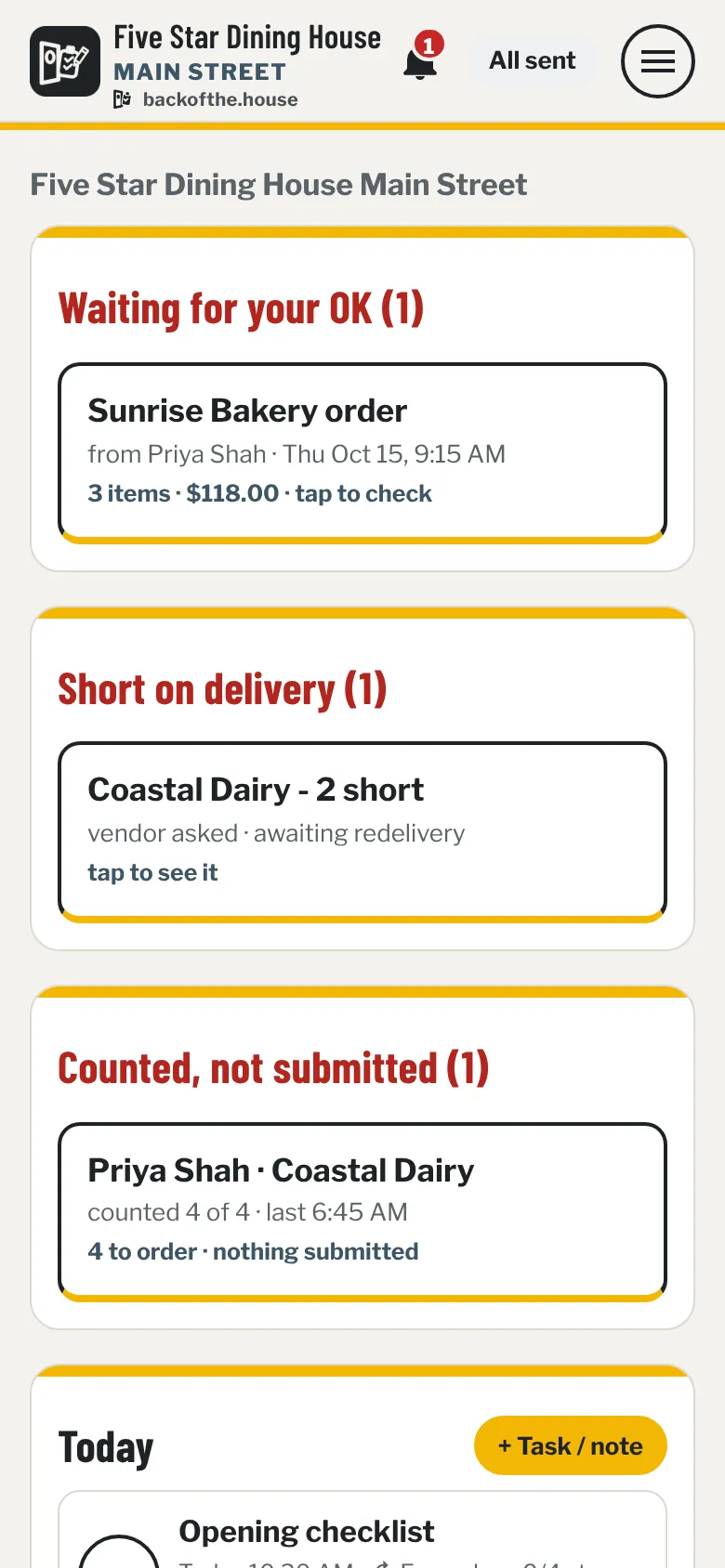
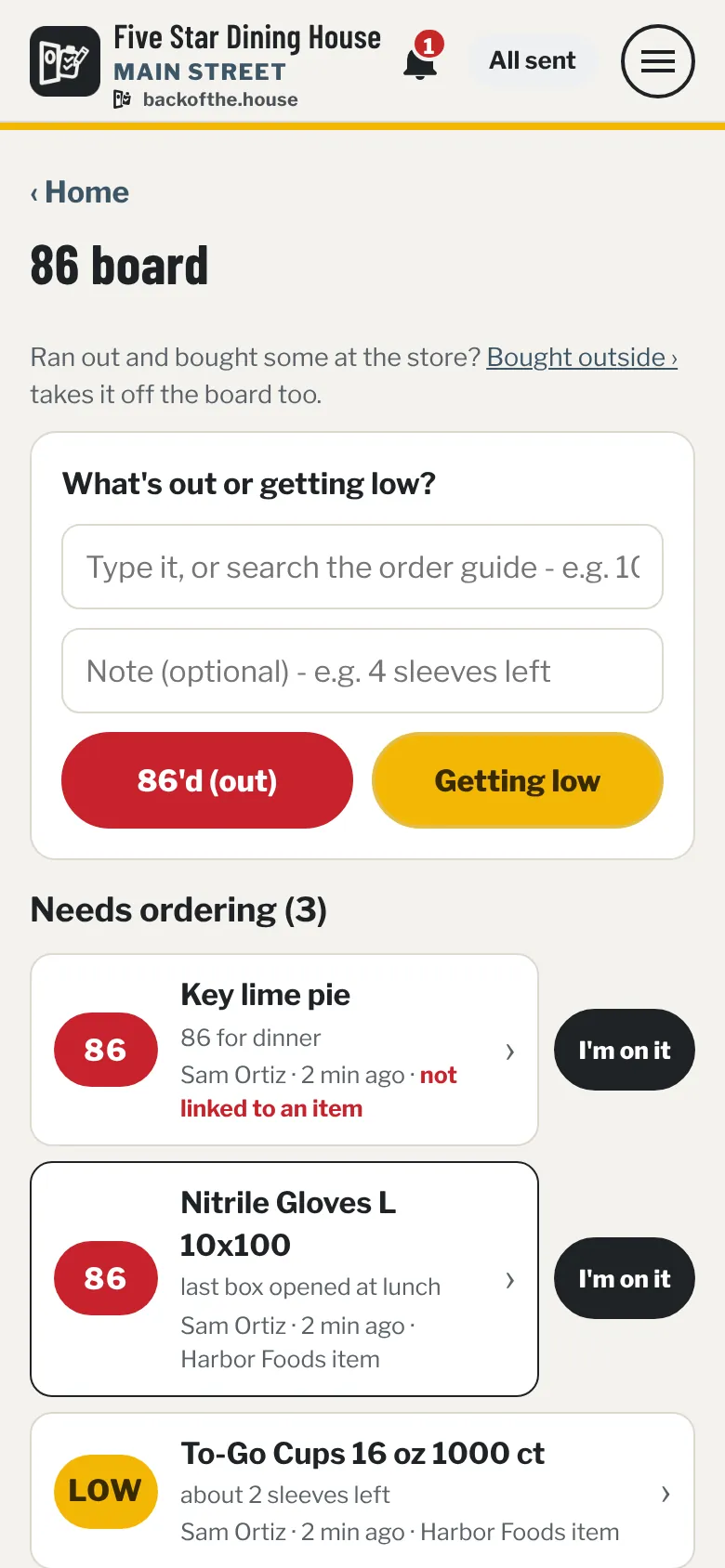
86 board: buttons for 86'd and Getting low, and items needing ordering with I'm on it buttons.
The count sheet in Spanish: Main Vendors with 28 de 28 contados hoy and the button Terminé de contar - hacer pedido.
Everyone sees what they need

Seven roles, set per location.

What each role does out of the box (change any of it per role or per person)
RoleCount & orderCheck in deliveriesInvoicesManage people
OwnerYesYesAll, incl. rentEveryone
AdminYesYesAll + exportAdmins and below
General ManagerYesYesAll, incl. rentManagers and below
ManagerYesYesAll, incl. rentKitchen Staff, Crew
Kitchen StaffYes, for reviewYesFood bills, view-
Crew Lead-YesFood bills-
Crew--Their own scans-

Your name, your look

The app leads with your restaurant's name and logo. Each location gets its own address - yourplace.backofthe.house.

Every location separate

Own vendors, pars, people and photos per store - and a different look per store, so nobody orders for the wrong one.

Install from the browser

Add it to the home screen. It opens full-screen, sends notifications and stays signed in. No app store.

Printable

Orders print clean for the clipboard. Step-by-step crew cards in English and Spanish, ready to post.

History that sets pars

Every order remembers what was on the shelf. The par report suggests better pars from real use - you decide.

Backed up nightly

The database and every invoice image are copied every night.

Sales from your POS

API access to your POS provider may be available, depending on your provider. Where it is, daily sales and top sellers sit next to your counts and pars. Ask your POS provider about it.

Built in a real kitchen

Not designed in a boardroom. Designed by the back door.

BackOfThe.House started as the ordering system for a busy, high-volume restaurant kitchen. It replaced an old ordering database and a lot of clipboards, one real problem at a time: the Wednesday weekend count, the driver who shorted two cases, the eggs someone grabbed at the restaurant supply house.

It still runs that kitchen every day, through the rushes and the weekend volume. And it works just as well for a small kitchen with a short order guide: less time on counts and orders, fewer surprises at the back door. Now it's opening up to other restaurants.

  • Every daycounting, ordering and check-in in a high-volume kitchen
  • Offline-firstbuilt for basements and walk-ins with no signal
  • 2 languagesfor the whole crew, picked per person
See it for yourself

Walk through Five Star Dining House.

A made-up restaurant with a week of history: orders, a short delivery, invoices, the 86 board and tasks. Sign in as any role and see what that person sees. It resets every night, and nothing is ever really emailed.

  • OwnerDana Reyeseverything
  • ManagerMarco BellOK orders, shorts
  • Kitchen StaffPriya Shahcount & order
  • Crew LeadSam Ortizcheck in, 86 board
  • CrewJules Kimtasks, scans

Tap a role on the sign-in page - no password to type. Best on a phone.

Early access

Founding restaurants wanted.

We're bringing on a small group of independent restaurants first, and setting each one up by hand.

  • Your order guide and vendors loaded from what you use today.
  • Your name and logo, at your own address.
  • Help getting the crew on their phones.

Tell us your restaurant, how many locations and your main vendors. Or email [email protected].

Questions

Do we need new hardware?

No. It runs on the phones your team already has - iPhone or Android - and on any computer for the office.

What if there's no signal in the walk-in?

Counting, + / −, the 86 board, ticks and invoice photos all save on the phone. A pill shows what's waiting, and it sends the moment there's signal.

Do our vendors have to sign up for anything?

No. They get an ordinary email order from your restaurant's address. Vendors you order from on a website get a clean list to copy instead.

Does it connect to QuickBooks?

It exports. Download the purchase ledger as a file and import it into your accounting software - no logins to your books shared with anyone.

Can it connect to our POS?

It depends on your POS provider. Many offer API access, sometimes only on certain plans or as an add-on. Where it's available, BackOfThe.House can tie your sales and usage in: daily sales split weekday and weekend, and top sellers next to your pars, shown only to the roles you choose. It only reads; nothing in your POS is changed. Contact your POS provider to ask about API access for your account, then tell us who they are and we'll take it from there.

Does the crew need to speak English?

No. Each person picks English or Español, including their phone notifications. Item names stay as the vendor writes them, so they match the invoice.

We have more than one location.

Each location gets its own app, address, vendors, pars and people. Owners and managers who work at several switch between them from the menu.

Who sees the rent and the utility bills?

Only owners, admins and managers. Each vendor has a food / non-food switch, and new ones start private until someone marks them as food.